[무료 배포] 단순 반복 업무를 끝내줄 생산성 도구, 'My Quick Phrases'를 소개합니다.
안녕하세요. 1인 개발자로 활동하며 매일 키보드와 씨름하고 있는 관리자입니다.
직장 생활을 하거나 개인 프로젝트를 진행하다 보면, 하루에도 수십 번씩 똑같은 문장을 타이핑해야 하는 순간들이 반드시 찾아오기 마련입니다. 고객 응대용 CS 이메일 템플릿, 매번 터미널에 입력해야 하는 복잡한 명령어, 코딩할 때 자주 쓰는 코드 스니펫 등등... 매번 과거의 메모장을 열어서 드래그하고 복사한 뒤 다시 붙여넣는 이 과정이 너무나도 번거롭고 비효율적으로 느껴졌습니다.
그래서 제 입맛에 딱 맞으면서도 컴퓨터 리소스를 차지하지 않는 아주 가벼운 생산성 도구를 직접 개발했습니다. 이름하여 **'My Quick Phrases (버전 1.3.0)'**입니다. 자주 사용하는 문구와 템플릿을 미리 저장해 두고, 필요할 때마다 클릭 한 번으로 간편하게 복사할 수 있는 프로그램입니다.
복잡한 설치 과정 없이 클릭 한 번으로 실행되는 단일 파일(.exe)로 배포하고 있으니, 오늘 이 포스팅을 통해 여러분의 업무 시간을 획기적으로 줄여보시길 바랍니다.
🌟 왜 'My Quick Phrases'인가요? (주요 핵심 기능)
시중에는 이미 훌륭한 상용 텍스트 대치 프로그램들이 많지만, 유료 결제를 유도하거나 기능이 너무 무겁다는 단점이 있었습니다. 저는 본연의 기능에 충실하면서도 디테일한 사용자 경험(UX)을 살리는 데 집중하여 다음과 같은 기능들을 구현했습니다.
지능형 드래그 앤 드롭 (1.5초 롱프레스): 이 프로그램에서 제가 가장 신경 쓴 부분입니다. 마우스로 카드를 단순히 끌어서 옮기는 방식을 쓰면, 복사하려고 클릭했다가 실수로 순서가 뒤죽박죽 섞이는 짜증 나는 상황이 발생합니다. 이를 완벽히 방지하기 위해 문구 카드를 '1.5초 동안 길게' 눌러야만 이동 모드가 활성화되도록 설계했습니다. 이동 모드가 켜지면 카드의 색상이 변경되며, 드래그하는 동안 문구들의 위치가 실시간으로 자리를 바꾸는 스왑(Real-time Swap) 기능이 작동하여 아주 직관적인 정렬이 가능합니다.
주석 및 힌트 제공: 텍스트 본문 외에도 해당 문구가 어떤 용도인지 한눈에 알아볼 수 있도록 짧은 설명(주석)을 달 수 있는 기능을 추가했습니다.
항상 위(Always on Top) 고정: 브라우저나 다른 문서 창을 여러 개 띄워놓고 작업하더라도 프로그램이 뒤로 숨지 않도록, '📌 항상 위' 체크박스를 활성화하면 다른 창을 클릭해도 프로그램이 가려지지 않습니다.
안전한 데이터 관리 (Import/Export): 애써 저장한 템플릿 리스트를 잃어버리지 않도록
.json파일 형태로 내보내어 저장(Export)할 수 있습니다. PC를 바꾸더라도 저장된.json파일을 다시 불러오면(Import) 기존 리스트를 완벽하게 복구할 수 있습니다.다국어 및 자동 업데이트 지원: 헤더에 위치한 KO / EN 버튼을 누르면 한국어와 영어 인터페이스로 즉시 전환됩니다. 또한 프로그램이 시작될 때 GitHub 서버의 버전 정보를 확인하여 최신 버전이 배포되었을 경우 자동으로 업데이트 안내 창을 띄워줍니다.
🚀 초간단 사용 가이드
프로그램의 인터페이스는 누구나 설명서 없이도 쓸 수 있을 만큼 아주 직관적입니다.
문구 추가하기: 상단에 있는
+ 문장 추가버튼을 눌러주세요. 용도를 알 수 있는 짧은 주석과 템플릿 본문을 입력하시면 리스트에 새로운 카드가 생성됩니다.복사하기: 본문에 붙여넣을 준비가 되셨나요? 리스트에 있는 문구 카드를 가볍게 '짧게 클릭'하기만 하면 즉시 클립보드에 복사됩니다.
수정 및 삭제: 등록된 카드 우측 하단을 보시면
✎(수정)버튼과✕(삭제)버튼이 마련되어 있어 언제든지 내용을 고치거나 지울 수 있습니다.순서 변경하기: 자주 쓰는 문구를 위로 올리고 싶다면 해당 카드를 1.5초간 꾹 누른 상태에서 원하는 위치로 끌어다 놓으시면 됩니다.
🛠 설치 및 실행 방법
복잡한 파이썬 환경이나 추가 프로그램 설치는 전혀 필요 없습니다. USB에 담아서 어디서든 바로 실행할 수 있는 포터블 형태입니다.
이 게시글 하단(또는 제공된 링크)에서
MyQuickPhrases.exe파일을 다운로드합니다.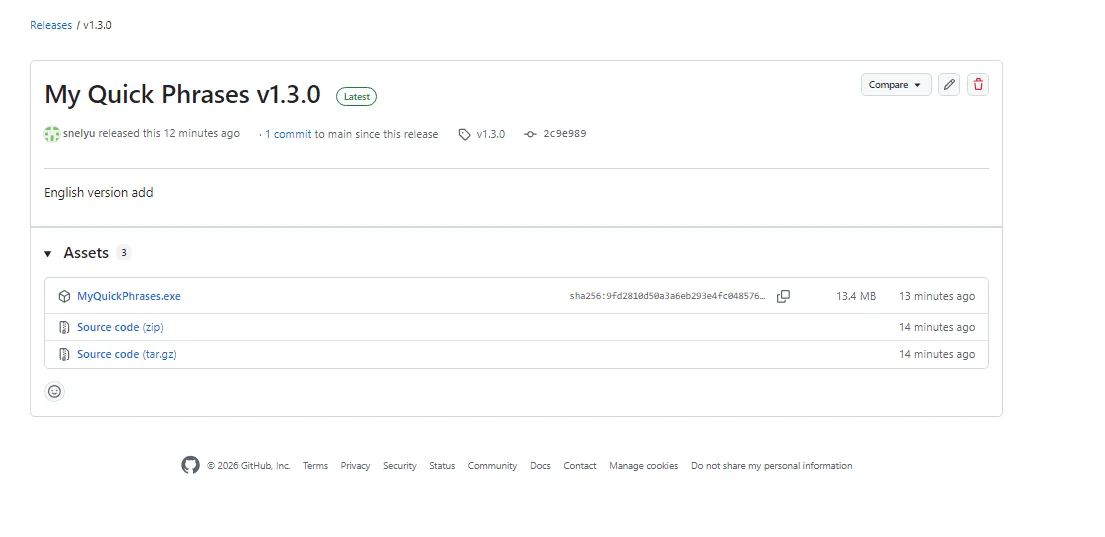
<myquickphrases.exe 를="" 클릭해서="" 다운="" 받아주세요=""></myquickphrases.exe>
다운로드한 파일을 원하는 폴더에 넣고 더블 클릭하여 실행하기만 하면 모든 준비가 끝납니다!
(참고: 보안 경고가 뜰 경우, 1인 개발자가 서명 없이 배포한 안전한 파일이니 '추가 정보' -> '실행'을 눌러주시면 됩니다.)
⚖️ 맺으며
단순 반복 타이핑에 쏟는 1분의 시간을 아껴서, 진짜 창의적인 아이디어를 고민하는 데 이 도구가 작은 보탬이 되었으면 좋겠습니다. 1인 개발이나 업무 자동화에 관심이 많으신 분들이라면 더욱 유용하게 쓰실 수 있을 거라 확신합니다.
본 프로그램의 저작권은 Copyright © 2026 inspeep. All rights reserved. 규정을 따릅니다. 자유롭게 업무에 활용하시되, 프로그램을 사용하시면서 발생하는 버그나 추가되었으면 하는 기능 등 소중한 피드백이 있다면 언제든지 이메일([email protected])로 문의해 주시거나 아래 댓글로 남겨주시면 감사하겠습니다.
여러분의 피드백이 다음 버전을 깎고 다듬는 가장 큰 원동력이 됩니다. 그럼 오늘도 칼퇴근을 향해 파이팅하시길 바랍니다!
------------------------------------------------------------------------------------------------------------------------------------------------------
Hello everyone! As a solo developer who spends most of the day wrestling with a keyboard, I wanted to share something I built to solve a very personal (and probably universal) frustration.
Whether you are answering customer support emails, running the same terminal commands over and over, or pasting standard code snippets, we all have those phrases we type dozens of times a day. Opening up a messy notepad, highlighting the text, copying, and pasting—it's just too inefficient and, frankly, exhausting.
That is exactly why I developed a lightweight, resource-friendly productivity tool tailored to fix this exact problem. It is called 'My Quick Phrases' (v1.3.0). It allows you to save your most frequently used templates and copy them to your clipboard with a single, satisfying click. Best of all, I am distributing it as a standalone, zero-installation executable (.exe) file. Today, I'd like to share this tool with you for free and walk you through how to get the most out of it.
🌟 Why choose 'My Quick Phrases'? (Key Features)
There are plenty of text replacement apps out there, but many require paid subscriptions or are bloated with unnecessary features that slow down your PC. I focused purely on core functionality while obsessing over the user experience (UX).
Intelligent Drag & Drop (1.5s Long-Press): This is the feature I am most proud of. With standard drag-and-drop, you often accidentally reorder your list when you just meant to click and copy. To completely prevent this frustrating scenario, I designed the cards so that you must 'long-press' them for 1.5 seconds to activate move mode. Once activated, the card changes color, and as you drag it, the other phrases smoothly swap positions in real-time, making organizing your list incredibly intuitive.
Notes & Hints: A huge block of text can be hard to identify at a glance. I added a feature that lets you attach a short, descriptive note (or hint) to each phrase, so you know exactly what the template is for before you even click it.
Always on Top: If you are juggling multiple browser tabs or documents, the last thing you want is for your clipboard tool to hide behind other windows. By checking the '📌 Always on Top' box, the application stays pinned directly above everything else.
Safe Data Management (Import/Export): I know how devastating it is to lose carefully crafted templates. You can easily back up your entire list by exporting it as a
.jsonfile. If you ever switch computers, simply import that file, and your workspace is instantly restored.Bilingual & Auto-Update: The UI isn't stuck in one language. Click the KO / EN button at the top to seamlessly toggle between Korean and English interfaces. Plus, upon startup, the app checks the GitHub server for the latest version and notifies you if an update is available.
🚀 Quick & Easy Usage Guide
The interface is so straightforward you probably won't even need this guide, but here is the quick rundown:
Add a Phrase: Click the
+ Add Phrasebutton at the top. Type in a short note to identify it, paste your main text, and a new card will be added to your list.One-Click Copy: Ready to paste? Just give the phrase card a quick, short click. The content is instantly copied to your clipboard.
Edit & Delete: Made a typo? No problem. Use the
✎ (Edit)or✕ (Delete)buttons located at the bottom right of any card to modify your list at any time.Reorder: Need your most used phrase at the top? Press and hold the card for 1.5 seconds, then simply drag it exactly where you want it.
🛠 Installation & Execution
Forget about complex Python environments, messy dependencies, or annoying installer wizards. This is a fully portable application that you can even carry around on a USB drive.
Download the
MyQuickPhrases.exefile from the link at the bottom of this post.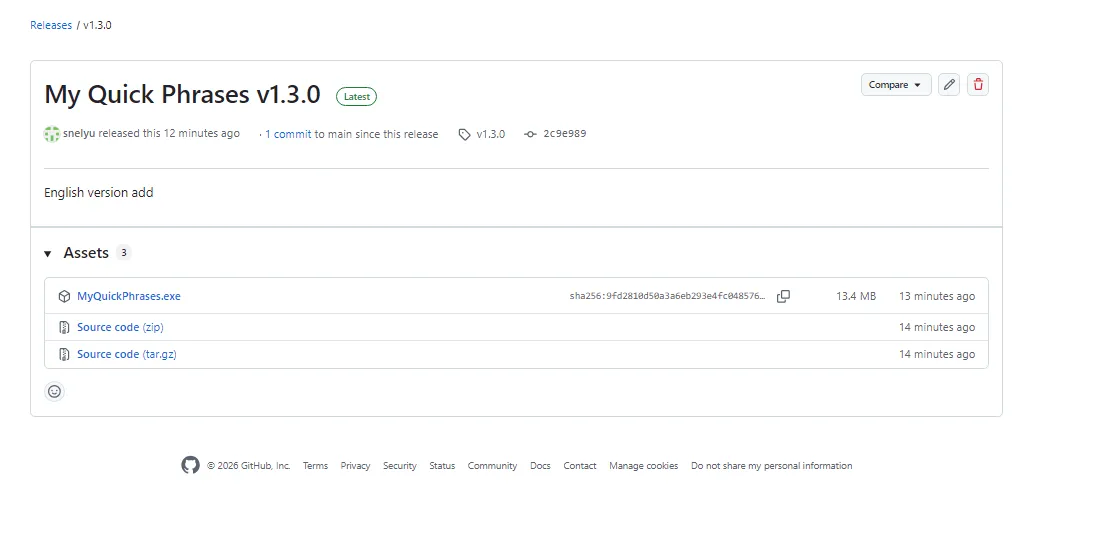
<click the="" myquickphrases.exe=""></click>
Place the file in any folder you prefer and double-click to run it. That’s it! Everything is ready to go.
(Quick Note: Because I am an independent developer distributing this without a costly enterprise digital signature, Windows SmartScreen might flag it. Rest assured, it is completely safe. Just click 'More info' and then 'Run anyway'.)
⚖️ Final Thoughts
If this tool can save you even just one minute of mindless typing so you can focus on truly creative work, I will consider it a massive success. It is especially useful for fellow solo developers, office workers, or anyone interested in workflow automation.
The copyright for this software belongs to Copyright © 2026 inspeep. All rights reserved. Feel free to use it for personal or business purposes. If you encounter any bugs, or if you have a brilliant idea for a new feature, please don't hesitate to reach out to me at [email protected] or leave a comment below.
Your feedback is the absolute best fuel for the next update. Have a great day, and I hope this little tool helps you clock out a little earlier today!
IT 게시판





💬 댓글 0개